
U LAM LOU


SONY Connected Learning Pathway
FALL 2021
September 2021 - November 2021
Role - UX Designer / UX Researcher
Overview
Sony Electronics is a leading provider of audio/video electronics and information technology products for the consumer and professional markets, including Smart TV’s. Today, Smart TV’s have features that allow users to game, surf the web, take pictures, and more–much like a laptop or phone. However, how many of us who own a Smart TV actually use these features? Our team realised that many of these features remained unused because the remote doesn’t afford easy and seamless use of these features. Like a keyboard is to a laptop, and a touch screen is to a phone, we wanted to create a remote that provides users seamless interaction with the TV in the context of these new advanced features a TV can provide.
User Research
Our team conducted an in-term user test with the Sony Bravia TV and were shocked at how advanced Smart TV’s have gotten: voice control, games, app store, built-in camera, integrations with other devices, and more. However, we realised that while the Smart TV had many cool features, the TV remote didn’t allow us the means to fully experience these features. For example (seen in video below), it was hard for us to play a simple game because the remote was an unideal shape to fit into the gamer’s hand, and also because the remote doesn’t have the right buttons/features needed to successfully play the game.

Fig 1. Video on testing the TV
User interviews showed similar results. One user, who typically used the Smart TV to browse content on not-so-legal websites (oop) claimed that it was “annoying to type in websites/google search everything on Smart TV,” referring to moving the mouse across a digital keyboard to individually type each letter.
Additionally, users made other comments on the remote, such as:
-
There are unnecessary buttons that cause confusion
-
Their ideal remote should have voice control
-
They preferred a physical remote over a mobile, app-based remote,
-
The TV is a device shared between members of a family with different interests and technical capabilities
Problem Space & Target User
We decided to design for the novice gamer who would like to get into gaming, but is not fully invested in buying additional gaming devices (e.g. Switch, Playstation) in order to start. Our user, however, has a smart TV at home, whom she shares with other members of her family.

Fig 2. Persona
Mock Up
Our idea of the device comes from the virtual controls for mobile games, remote control that is linked to the screen on planes, Nintendo Switch consoles, Wii, and the transformer that appears in the anime “Futari Wa Pretty Cure”.

Fig 3. Mock up for touch screen

Fig 4. Mock up for physical remote
User Testing
We narrowed down on 5 objectives to guide our testing methods:
-
Test to see if users would use the TV remote as a gaming console
-
For viability - are users generally interested in a TV remote that supports this use case (gaming)?
-
-
Test to see if the buttons are in intuitive locations on the TV remote mode
-
For usability - how does this controllers feel in the hands of gamers? Where can we better place buttons to fit how the remote controller is held (as a TV remote or gaming console)
-
-
Test to see if the buttons are in intuitive locations on the TV remote mode
-
For usability - how does this controllers feel in the hands of gamers? Where can we better place buttons to fit how the remote controller is held (as a TV remote or gaming console)
-
-
Test to see if the buttons signify what they afford on the TV remote mode
-
For functionality - how does a user’s mental model of each button change when seen in different mediums (TV remote or gaming controller)?
-
-
Test to see if the buttons signify what they afford on the gaming controller mode
-
For functionality - how does a user’s mental model of each button change when seen in different mediums (TV remote or gaming controller)?
-
Here are a few methods we used to test out the different objectives:
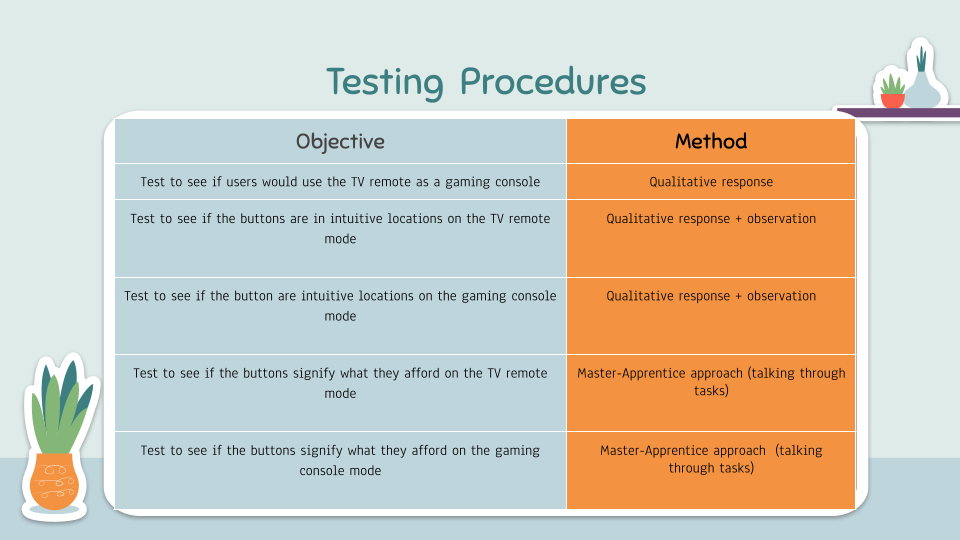
Fig 5. Testing Procedure
Physical Prototype

Fig 6. Video for a simple physical prototype
Final Prototype


Fig 7. Final prototype of the physical remote